Free desktop app for Windows
Blur every face in a video, automatically.
Faceless finds each face in a video or photo, follows it as it moves, and hides it with a blur, pixels or a black box. Keep the faces you choose, then save a copy at the same resolution with the original sound.
Faces are blurred on this computer. Nothing is uploaded.
No installer, no sign-up, no watermark, no time limit. First-run steps
How it works
Three steps, all on your own computer.
- 1
Open a video or photo
Click Open video or photo, or drop the file onto the window.
- 2
Check the faces
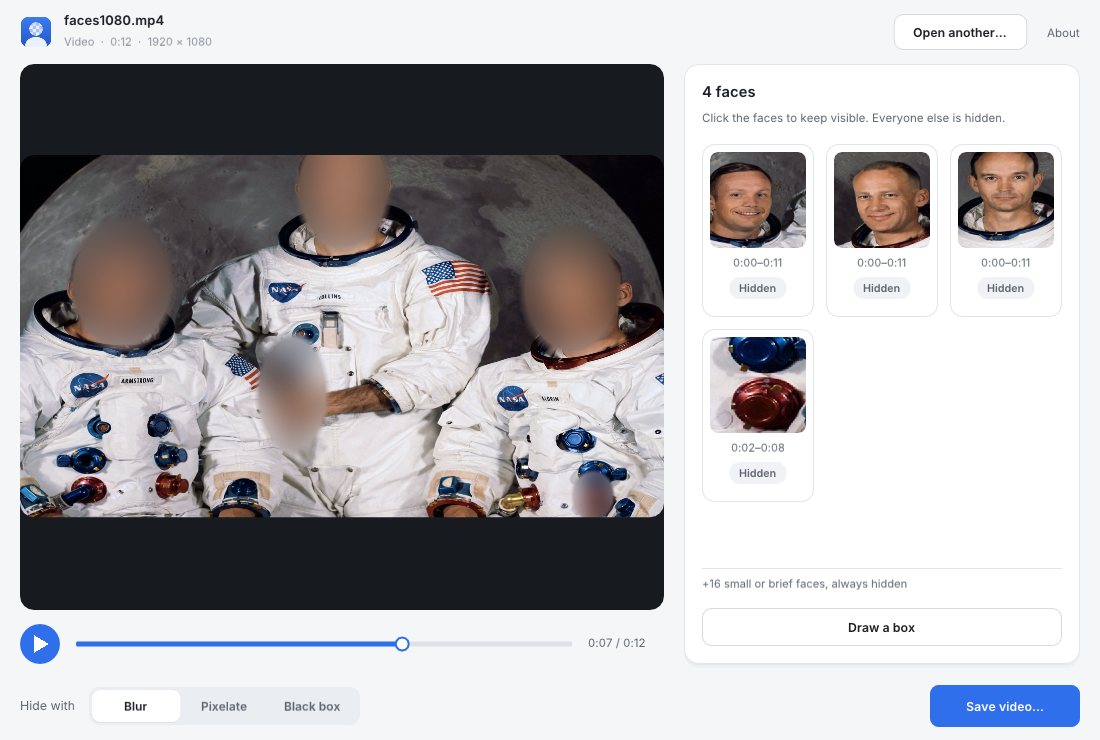
Faceless checks the video frame by frame, then plays it with each face hidden. Click a face to keep it visible, draw a box over any face it missed, and pick Blur, Pixelate or Black box.
- 3
Save
You get a new file next to the original, at the same resolution and with the original sound. The original isn't touched.
Hide faces before you share
For street videos, school plays, sports days, parties, incident clips and security camera footage: share the moment without showing people's faces.
Frame by frame, automatically
Faceless looks for faces up to 30 times a second, and at full size 15 times a second, so small faces in the background are caught too.
You decide what's hidden
Each face found gets its own picture: click one to keep it visible, like your own. Missed a face? Draw a box over it, and the box follows that face through the video.
Blur, pixelate or black box
Three looks, each drawn at a strong, fixed strength so a face can't be made out.
No face flashes through
A face that turns away or is covered stays hidden where it was, for up to 3 seconds.
Same resolution, same sound
The saved video keeps the size and rotation of the original, and its sound.
Videos and photos
MP4, MOV and M4V videos up to 4K, and JPG and PNG photos. Saved photos lose their metadata, GPS location included.
Nothing is uploaded
Faces are found and hidden on your computer. It works offline.
No watermark, no sign-up
No account, no time limit, no ads. It's free.
Portable
One file and no installer: download it, double-click it, and it runs.
Download Faceless
Build 1. One file for each computer: no installer, nothing else to download.
Windows
Windows 10 or 11, 64-bit
THE FIRST TIME YOU RUN IT
- Double-click the file you downloaded. There's nothing to install.
- If your browser asks whether to keep the file, choose Keep.
- If Windows says "Windows protected your PC", click More info, then Run anyway. It asks because the app isn't signed, and only the first time.
Questions
Which files does it open?
Videos: MP4, MOV and M4V with H.264 video, up to 4K. Photos: JPG and PNG. iPhone videos are often HEVC: on Windows they open once you install Microsoft's HEVC Video Extensions from the Microsoft Store.
What does it save?
A new file next to the original. Videos are saved as MP4 (H.264) at the same resolution, with the original sound. Photos are saved upright as JPG or PNG, with their metadata, including any GPS location, removed. The original file is never changed.
How long does it take?
Faceless checks the whole video frame by frame, so it's thorough rather than instant: about 1¼ minutes for each minute of 1080p video on a typical 6-core PC, about 1½ minutes for 4K, and under a minute for 720p. A photo takes a second or two.
Does it catch every face?
It looks for faces up to 30 times a second, and at full size for small ones 15 times a second, follows each face as it moves, and pads each box for hair and ears. Small faces in the background are always hidden; they just aren't offered in the list to keep. No detector is perfect, though: a tiny, very blurry or side-on face can be missed, so play the preview before you share, and draw a box over any face it missed.
Is anything uploaded?
No. Your videos and photos never leave your computer, and Faceless works offline. The app only counts launches, with a random ID, the platform and the build number; the privacy policy has the details.
Why does Windows warn me before it runs?
Faceless isn't signed with a paid certificate, so Windows SmartScreen doesn't know it yet. Click More info, then Run anyway. On Windows 11 with Smart App Control turned on, Windows blocks unsigned apps and has no Run anyway button.
Is there a Mac or Linux version?
Not yet. Faceless runs on 64-bit Windows 10 and 11.
Is it really free?
Yes. No watermark, no sign-up, no time limit and no ads.